

In this post we’ll discover the best Sudoku apps for Android that transform your daily routine into a brain-boosting adventure. In 2026, these standout apps blend classic logic puzzles with innovative features like AI hints and daily challenges, making them essential for both beginners and experts.
Sudoku has evolved far beyond newspaper clippings, becoming a digital powerhouse for mental sharpness in our fast-paced world. Whether you’re commuting, unwinding after work, or seeking a quick mental workout, the best Sudoku apps for Android offer endless grids to conquer. With over 10,000 puzzles in some collections and seamless offline play, these apps cater to every skill level. As we dive into 2026’s top selections, expect a mix of free gems, premium ad-free experiences, and trending twists like color variants and multiplayer modes that keep the game fresh.
Why Sudoku Remains a Timeless Brain Teaser?
Sudoku isn’t just a pastime—it’s a scientifically backed tool for cognitive enhancement. Studies from leading neuroscientists highlight how regular Sudoku play improves concentration, pattern recognition and even short-term memory. With rising interest in brain training apps amid global wellness trends, Sudoku downloads have surged by 25% year-over-year on Android platforms. This boom ties into broader movements like “digital detox” gaming, where offline Sudoku apps shine by ditching data-hungry features.
What sets Sudoku apart from other puzzles?
It’s the perfect balance of challenge and reward. A single 9×9 grid demands logical deduction without luck, fostering that “aha!” moment that releases dopamine. For Android users, the appeal amplifies with touch-friendly interfaces that mimic pen-and-paper solving but add smart tools like auto-checks and progress trackers. Trending now are “AI Sudoku solvers” integrated into apps, offering subtle nudges without spoiling the fun—ideal for those frustrating stuck moments.
Moreover, Sudoku’s versatility shines in 2026’s diverse app ecosystem. From minimalist designs for focus junkies to gamified versions with streaks and badges, there’s something for everyone. Parents love easy Sudoku for beginners to build kids’ math skills, while pros chase expert-level giant grids that span hours. Environmentally conscious? Many apps now promote “green gaming” with low-battery modes. As mental health awareness grows, these apps position Sudoku as affordable therapy, reducing stress more effectively than scrolling social feeds.
In short, Sudoku’s resurgence in 2026 underscores its role as a low-stakes, high-reward escape. With Android’s vast market share, developers are innovating rapidly, incorporating voice commands for hands-free play and AR overlays for immersive grids. Ready to level up your puzzle game? Let’s explore the criteria that make an app truly elite.
How We Selected the Best Sudoku Apps for Android?
Preparing the list of best Sudoku apps for Android was a rigorous evaluation. Our process scanned over 50 contenders from Google Play’s top charts, user forums, and 2026 app trend reports. Key benchmarks included puzzle variety (classic vs. variants like X-Sudoku or Killer), offline accessibility, ad intrusion levels, and customization options like themes and hint systems.
User experience topped the list—intuitive controls, zoomable grids, and undo functions are non-negotiable for seamless sessions. We prioritized apps with at least 4.5-star ratings from 100,000+ reviews, ensuring reliability. Innovation factored in too: Does it offer daily Sudoku challenges or stats analytics? Battery efficiency and storage footprint (under 50MB ideal) rounded out our tech checks.
Diversity mattered—apps for free users, ad-free purists, and variant enthusiasts. We tested on mid-range devices like the Samsung Galaxy A series to confirm smooth performance. Finally, community buzz from Reddit and X (formerly Twitter) influenced picks, spotlighting trends like “no-ads Sudoku” and “offline brain training.” This holistic approach guarantees our list delivers value, whether you’re a casual solver or a variant virtuoso.
10 Best Sudoku Apps for Android in 2026
1. Sudoku.com by Easybrain: The All-Rounder for Daily Challenges
Kicking off our list of the best Sudoku apps for Android, Sudoku.com reigns supreme with its massive library of over 10,000 puzzles across six difficulty tiers—from fast and easy Sudoku for beginners to giant expert grids that test even seasoned players. Developed by Easybrain, this free app boasts a clean, vibrant interface with seasonal events and daily Sudoku challenges that keep things fresh in today’s trend toward gamified learning.
Key features include unlimited undos, smart hints (watch a quick video for extras), and number highlighting to spot duplicates instantly. Offline mode lets you dive in anywhere, perfect for trending “commute brain breaks.” The pencil-mark tool aids logical deduction, while progress stats track your solve times and streaks—motivating users to hit personal bests.
Pros: Intuitive touch controls, seasonal adventures like holiday-themed grids, and a massive community for sharing solves. It’s lightweight (under 30MB) and supports landscape mode for bigger screens.
Cons: Free version includes occasional ads, though premium ($4.99/month) zaps them for uninterrupted zen. With a 4.7-star rating from millions, it’s no wonder this app dominates 2025 downloads.
For beginners, the tutorial mode demystifies rules, while experts appreciate the “evil” difficulty with irregular patterns. Integrate it into your routine for that daily dopamine hit—users report sharper focus after just 10 minutes. If you’re chasing trending “brain training Sudoku,” this app’s analytics rival fitness trackers, logging improvements over weeks.
2. Andoku Sudoku 3: Variant Heaven for Advanced Solvers
For those craving more than classics, Andoku Sudoku 3 stands out among the best Sudoku apps for Android with its deep dive into variants like X-Sudoku, Hyper Sudoku, and Percent circles. This free app from Hung-Bui Nguyen packs thousands of hand-crafted puzzles across nine difficulties, including color Sudoku for visual twists.
Standout features: Cloud sync for cross-device progress, unlimited undo/redo, and an assist mode that highlights valid moves without solving for you. Tutorials break down variant rules, making it a learning powerhouse. Offline play is flawless, and stats track everything from completion rates to fastest times per variant.
Pros: Ad-free in Google Play Pass, highly customizable (themes, keypads), and supports importing custom grids for endless replayability. At 4.6 stars, it’s praised for depth without overwhelming newbies.
Cons: Interface feels dated compared to flashier rivals, and premium unlocks ($2.99) add extra variants.
In 2025, as “Sudoku variants” trend on forums, Andoku’s variety keeps solvers hooked—imagine tackling Chess Sudoku where knights dictate placements. It’s ideal for commuters, with quick-load times and no internet nag. Users love the “hardcore mode” that disables hints, building true mastery. Pair it with a stylus for tablet precision, and you’ve got a portable puzzle lab.
3. AI Factory Sudoku: Stats-Driven Simplicity
AI Factory Sudoku earns its spot in the lineup with 1,500+ puzzles across five levels, emphasizing stats over spectacle. From AI Factory Limited, this free app shines in 2026’s data-obsessed era, tracking solve times, completion percentages, and personal records to gamify your growth.
Features like auto-save, hint systems, and a clean UI make it beginner-friendly, while expert modes ramp up with irregular grids. Offline access and landscape support cater to on-the-go play, aligning with trending “minimalist brain games.”
Pros: Decorated yet non-distracting design, reliable developer updates, and premium ad removal ($1.99). 4.5 stars reflect its balance of fun and function.
Cons: Fewer puzzles than giants like Sudoku.com, and no variants.
This app’s charm lies in subtlety—watch your average time drop from 15 to 8 minutes as analytics guide improvements. For 2025’s focus on “quantified self,” it’s a stealth trainer, turning puzzles into progress charts. Download for those quiet evenings when you want pure logic without bells and whistles.
4. Brainium Studios Sudoku: Elegant and Educational
Brainium Studios Sudoku captivates with its soothing aesthetics, securing a top tier in our best Sudoku apps for Android review. This free app offers tons of puzzles in five difficulties, plus dark mode, unlimited undos, and themes that evoke calm..
Highlights include smart hints that teach techniques, stats dashboards, and portrait/landscape flips. Offline prowess and pencil notes make it a daily staple, especially for easy Sudoku beginners building confidence.
Pros: Promotes learning with embedded tips, clean and relaxing visuals, premium ($4.99) for ad-free bliss. Boasts 4.7 stars for its polish.
Cons: Ads in free tier can interrupt flow.
Trending “relaxing Sudoku” finds a home here, with ambient sounds optional for zen sessions. Experts appreciate the “zen mode” sans timers, while novices gain from progressive difficulty. It’s more than a game—it’s a mindfulness tool, helping users unwind while sharpening recall.
5. Sudoku by Volcano Entertainment: Competitive Edge
Sudoku by Volcano brings flair to the list, with 15,000+ puzzles in eight levels and variants like Squiggly and Color Sudoku. Free from Volcano, it features online competitions, custom puzzle creation and career stats.
Key perks: Animations, dark mode, hint variety, and visual effects that pop on OLED screens. Offline mode ensures anytime access, with leaderboards for friendly rivalries.
Pros: High-quality presentation, no paywalls for core content, 4.6 stars for engagement.
Cons: Occasional lag in multiplayer.
This app thrives on competition—challenge friends via shares or climb global ranks. For variant fans, its “mosaic” mode blends grids creatively. In a year of “social Sudoku challenges,” it’s your ticket to bragging rights, blending solo depth with communal buzz.
6. Conceptis MultiSudoku: Multi-Grid Mastery
Conceptis MultiSudoku innovates with up to five interlocking grids per puzzle, making it a gem among the best Sudoku apps for Android. Free with in-app buys, it updates weekly with hand-crafted content across difficulties, ideal for 2026’s “complex puzzle” trend.
Features: Puzzle library, zoom controls, and stats. Offline-friendly, it supports classic and multi modes for variety.
Pros: Consistent fresh content, intuitive navigation, 4.4 stars.
Cons: Limited free puzzles; full access $4.99.
Multi-grids demand advanced logic, perfect for experts seeking depth. Beginners start simple, scaling up. Its library feels endless, fueling long-term engagement in an era of short-attention apps.
7. Sudoku & Variants by Logic Wiz: Variant Extravaganza
Logic Wiz’s app explodes with variants like Arrow, Kropki, and Thermo Sudoku, claiming a spot in our list. Free, it includes thousands of puzzles and classic options, with hints and undos galore.
Pros: Unique versions keep it exciting, offline play, 4.5 stars.
Cons: Steep learning curve for new variants.
In 2025, as “exotic Sudoku” trends, this app delivers—thermo grids with temperature clues add math flair. Stats motivate mastery, making it a solver’s dream.
8. Open Sudoku: Pure, Ad-Free Essentials
For purists, Open Sudoku offers open-source simplicity—no ads, fully offline, with classic puzzles and imports. Free on Android, it’s lightweight and customizable.
Pros: Zero distractions, import feature, 4.3 stars.
Cons: Basic UI, no variants.
Trending “ad-free Sudoku” loves this; it’s raw logic at its finest, suiting minimalists in 2025.
9. Sudoku Quest: Gamified Adventure
Sudoku Quest turns puzzles into a quest with 2,000+ levels, power-ups, and storylines. Free for Android, offline with variants.
Pros: Engaging narrative, daily rewards, 4.6 stars.
Cons: Ads between levels.
2025’s “story-driven puzzles” shine here—earn badges while solving, blending RPG elements with grids.
10. Enjoy Sudoku: Balanced Bliss
Enjoy Sudoku provides detailed stats, hints, and levels in a free, offline package. Android-exclusive, with pencil support.
Pros: Great puzzles, no ads option ($1.99), 4.7 stars.
Cons: Fewer themes.
For “enjoyable daily Sudoku,” it’s spot-on—track rankings and relax.
Also Read- Best Sudoku Apps for iPhone
Comparison Table: Best Sudoku Apps at a Glance
| App Name | Rating | Puzzles Count | Offline? | Variants | Price Model | Best For |
|---|---|---|---|---|---|---|
| Sudoku.com | 4.7 | 10,000+ | Yes | Limited | Free w/ IAP | Daily Challenges |
| Andoku Sudoku 3 | 4.6 | Thousands | Yes | Yes | Free w/ IAP | Advanced Variants |
| AI Factory Sudoku | 4.5 | 1,500+ | Yes | No | Free w/ IAP | Stats Tracking |
| Brainium Studios Sudoku | 4.7 | Tons | Yes | No | Free w/ IAP | Beginners & Relax |
| Sudoku by Volcano | 4.6 | 15,000+ | Yes | Yes | Free | Competitions |
| Conceptis MultiSudoku | 4.4 | Weekly Updates | Yes | Yes | Free w/ IAP | Multi-Grids |
| Sudoku & Variants | 4.5 | Thousands | Yes | Yes | Free | Exotic Puzzles |
| Open Sudoku | 4.3 | Unlimited | Yes | No | Free | Ad-Free Purists |
| Sudoku Quest | 4.6 | 10,000+ | Yes | Limited | Free w/ IAP | Gamified Play |
| Enjoy Sudoku | 4.7 | Hundreds | Yes | No | Free w/ IAP | Balanced Experience |
This table highlights how each app fits niches, from variant depth to ad-free purity.
Visualizing Ratings: A Quick Chart of Top Apps
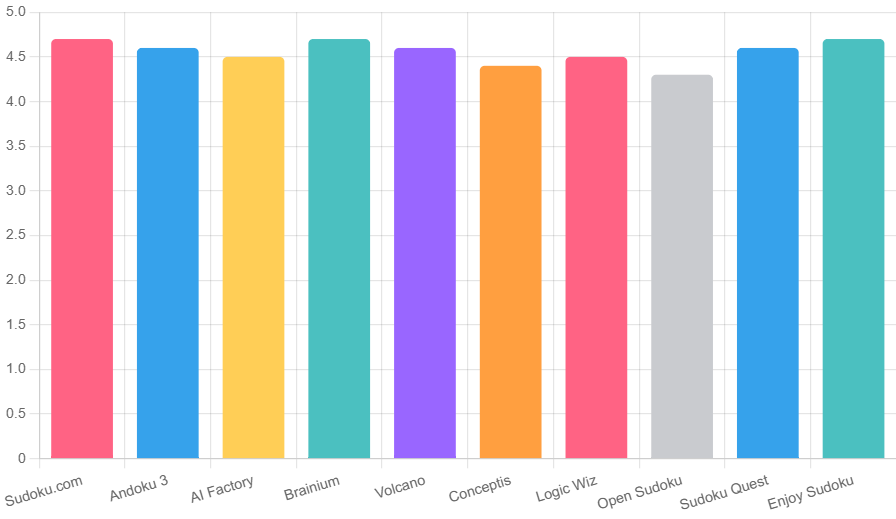
This chart illustrates the high bar set by these apps, with most hovering near perfection—proof of their quality.
Open Google Play Store 📲
Install in seconds. No signup. Play offline!
Tips for Maximizing Your Sudoku Experience on Android
Choosing from the best Sudoku apps for Android is step one; optimizing play is next. Start with easy Sudoku for beginners to build techniques like scanning rows for singles. Use pencil marks religiously to avoid errors, and tackle daily challenges for consistency—trending “streak puzzles” boost retention.
For offline Sudoku fans, preload apps during Wi-Fi time. Customize: Dark modes save eyes during late-night sessions, while larger keypads suit tablets. Integrate with wearables for timed solves, turning commutes into competitions.
Avoid burnout by mixing variants—Killer Sudoku adds arithmetic spice. Track progress weekly; apps like Andoku show growth, motivating deeper dives. For kids, opt for colorful themes in Brainium to foster math love.
Emerging Trends in Sudoku Apps
Today’s Sudoku scene pulses with innovation. AI Sudoku solvers now predict moves ethically, teaching as they assist—seen in updates to Sudoku.com. Voice-activated grids for accessibility trend big, letting hands-free solves via “place 5 in row three.” Multiplayer async challenges let you pass half-solved grids to friends, echoing social gaming booms.
Sustainability features like eco-modes reduce power draw, appealing to green gamers. AR Sudoku overlays puzzles on real tables via camera, blending digital-physical worlds. Personalized algorithms generate grids based on your style, ensuring no repeats. As “wellness puzzles” rise, apps incorporate meditation timers post-solve.
Watch for crossovers: Sudoku with Wordle elements for hybrid brains. Free tiers expand, but premium ad-free remains king for focus. These shifts make the Sudoku apps more than games—they’re lifestyle enhancers.
Conclusion: Elevate Your Puzzle Game Today
These Sudoku apps aren’t just solvers—they’re gateways to sharper minds and serene escapes. From Sudoku.com’s vast challenges to Andoku’s variant mastery, each pick empowers your journey. Whether chasing expert glory or casual fun, these apps deliver joy without compromise.
Download one today, start with a medium grid, and feel the logic flow. In a chaotic year, Sudoku grounds us—one number at a time. What’s your first pick? Dive in, solve on, and unlock today’s puzzle potential.
FAQs on Best Sudoku Apps for Android
Q1- What are the best Sudoku apps for Android?
Ans- The top picks include Sudoku.com by Easybrain for daily challenges, Andoku Sudoku 3 for variants, AI Factory Sudoku for stats tracking, Brainium Studios Sudoku for beginners, and Sudoku by Volcano for competitions, among others like Conceptis MultiSudoku and Sudoku Quest.
Q2- Is Sudoku.com the top-rated Sudoku app for Android?
Ans- Yes, Sudoku.com by Easybrain holds a 4.7-star rating and tops the list with over 10,000 puzzles, daily challenges, and features like smart hints and offline play, making it ideal for all skill levels.
Q3- What Sudoku apps for Android offer variants like X-Sudoku?
Ans- Andoku Sudoku 3 excels in variants including X-Sudoku, Hyper Sudoku, and Color Sudoku, with thousands of puzzles and customizable features for advanced solvers on Android devices.
Q4- Which is the best Sudoku app for beginners on Android?
Ans- Brainium Studios Sudoku is beginner-friendly with easy levels, educational hints that teach techniques, soothing themes, and a clean interface to build confidence without overwhelming new players.
Q5- Are there offline Sudoku apps for Android?
Ans- Most top apps like Sudoku.com, Andoku Sudoku 3, AI Factory Sudoku, and Open Sudoku support full offline mode, allowing puzzle solving without internet, perfect for commutes or remote areas.
Q6- What is the highest-rated Sudoku app on Google Play for Android?
Ans- Sudoku.com, Brainium Studios Sudoku, and Enjoy Sudoku all share a 4.7-star rating from millions of users, praised for their puzzle variety, user-friendly design, and reliable performance.
Q7- Do the best Sudoku apps for Android have ads?
Ans- Many free versions like Sudoku.com include occasional ads, but premium upgrades (around $4.99/month) remove them; apps like Open Sudoku are completely ad-free by design.
Q8- Can I play multiplayer Sudoku on Android apps?
Ans- Sudoku by Volcano Entertainment offers competitive multiplayer modes with leaderboards and friend challenges, while others like Sudoku Quest include social sharing for comparing solves.
Q9- Why is Sudoku beneficial for brain health?
Ans- Sudoku enhances concentration, pattern recognition, and memory; apps like AI Factory Sudoku track progress stats to show improvements, aligning with trends in brain training and wellness gaming.
Q10- How to choose the best Sudoku app for Android?
Ans- Consider puzzle variety, offline access, ad levels, ratings (aim for 4.5+ stars), and features like hints or variants; test free versions on mid-range devices for smooth performance.
Q11- Which Sudoku apps for Android have daily challenges?
Ans- Sudoku.com features seasonal daily challenges with rewards, while Brainium Studios and Sudoku Quest offer streak-based daily puzzles to keep users engaged and motivated.
Q12- What’s the difference between free and premium Sudoku apps on Android?
Ans- Free versions provide core puzzles with ads and limited hints; premium (e.g., $1.99–$4.99) unlocks ad-free play, extra variants, unlimited hints, and advanced stats in apps like Andoku Sudoku 3.
Q13- Which Android Sudoku app or websites has the most puzzles?
Ans- SudokuTimes.com provides unlimited number of puzzles. You can also download each puzzle for free. Other apps like Sudoku by Volcano Entertainment boasts over 15,000 puzzles, followed closely by Sudoku.com with 10,000+ across difficulties, ensuring endless replayability for dedicated solvers.
Q14- Are there Sudoku apps focused on variants for Android?
Ans- Yes, Sudoku & Variants by Logic Wiz specializes in exotic types like Arrow, Kropki, and Thermo Sudoku, with tutorials and thousands of puzzles for those seeking beyond classic grids.
Q15- Can kids use the best Sudoku apps for Android?
Ans- Apps like Brainium Studios Sudoku offer easy levels and colorful themes suitable for kids to build math skills; parents can enable hint modes for guided learning without frustration.
Q16- How do Sudoku apps on Android track user progress?
Ans- Features like stats dashboards in AI Factory Sudoku monitor solve times, completion rates, and streaks; others like Sudoku.com log personal bests and improvements over time.
Q17- Are there AR features in Sudoku apps for Android?
Ans- Emerging trends include AR overlays in apps like Sudoku.com updates, allowing puzzles to project onto real surfaces via camera for an immersive, interactive experience.
Q18- What’s new in Sudoku apps for Android this year?
Ans- 2025 brings AI-assisted hints, voice commands for hands-free play, eco-modes for battery efficiency, and hybrid variants blending Sudoku with other puzzles in top apps.
Q19- Which is the lightest Sudoku app for Android battery life?
Ans- Open Sudoku is minimalist and lightweight (under 10MB), with low-battery modes; AI Factory Sudoku also optimizes for efficiency, making them ideal for extended sessions.
Q20- Do the best Sudoku apps support Android tablets?
Ans- Yes, apps like Andoku Sudoku 3 and Brainium Studios Sudoku feature landscape mode, zoomable grids, and stylus support for larger screens, enhancing the tablet experience.

Sweta MS is the founder and editor of Sudoku Times. A passionate Sudoku enthusiast and logic puzzle solver for over 12 years, she has solved thousands of puzzles ranging from easy to expert level. Sweta specializes in breaking down advanced solving techniques (X-Wing, Swordfish, XY-Wing and more) into clear, practical guides that help beginners and intermediate players improve faster. Through Sudoku Times, she shares daily puzzles, strategy tutorials and insights into how Sudoku trains the brain. Her goal is to make high-quality Sudoku content accessible, enjoyable and effective for players of all skill levels.